This. The “mobile-ization” of desktop interfaces is a bane on current computing. The metaphors of work between desktop and mobile devices are wildly different.
Obligatory car analogy: a mechanic working in his shop has a completely different set of tools available than if he was going into the field to fix a car.
I dislike Gnome on a pure desktop or non-touch laptop, in part because of UI decisions I think are meant to work better on a touchscreen. It's really good on a touchscreen though aside from the horrid onscreen keyboard.
> I really think GNOME is good at making an interface that works well on both,
I agree with the comment from @zak on this.
I have to disagree.
I have used GNOME (both GNOME Mobile and Phosh) on phones, and it makes more sense there, but it's still a bit clunky and fiddly.
Example: you only get half the tiny screen for your app launcher. So it fills up fast. So, you put apps in groups. BUT you can't pin groups to the fast-launch bar thing.
On the desktop, IMHO it does not work well. It works minimally, in a way that's only acceptable if you don't know your way around a more full-featured desktop. It feels like trying to use a computer with one hand tied behind my back. Yes, it's there, it's usable, but it breaks lots of assumptions and is missing commonplace core features.
Simple features: desktop icons are handy.
GNOME: ew, how ugly and untidy! We're taking them off you.
Obvious but complex features: menu bars go back to the 1970s and by the mid-1980s were standardised, with standard shortcut keys, with standardised entries in standardised places. They work well with a mouse, they work well with a keyboard, they work well with screenreaders for people with vision disabilities.
GNOME: Yeah, screw all those guys. Rips them out.
Non-obvious but core features: for over 30 years in Linux GUIs, you could middle-click on a title bar to send it to the back of the window stack.
GNOME: screw those guys. Eliminates title bars.
No, GNOME does not work _well_ on both. It is sort of minimally usable.
On both, it's minimally functional if you are not fussy, don't want to customise, don't have ingrained habits, and don't use keyboards and keyboard shortcuts much.
I actually think GNOME works best with the keyboard, they put a lot of effort into ensuring you can do everything without a mouse do to accessibility reasons. Even with a mouse, I don't hate the larger buttons. It means I don't have to be as precise with my mouse clicks.
I also think it breaking traditions is a good thing. It feels weird at first but without someone trying something new we won't see any progress. I do think they're a bit fast to do away with things they see as outdated but GNOME has a very particular design anyway that lets you get shit done when you learn it
It worked in Windows 2 and 3 and everything since. It worked in DOS since about 1990. It worked in OS/2. It works in Xfce, and up to a point in LXDE, LXQt, GNOME 1/2, MATE, Cinnamon, EDE, XPde, and lots of other Linux and xBSD GUIs. A form of it works on MacOS.
But GNOME ripped the whole UI out and has re-invented a worse version of its own. (KDE has partially kept something like it but changed half the keystrokes, which is almost worse.)
If you're blind or have some disability that stops you using a mouse, say, this makes it a TONNE more work.
Yeah. I'm actually planning on making a qwidgets based CUA desktop for BSD (and /Linux too I suppose). Despite not hating GNOME and being able to defend it we need a good unixy (IE, do one thing and do it well) desktop that doesn't try to do everything or pull in that many dependencies (it won't be based on KDEs libraries for example)
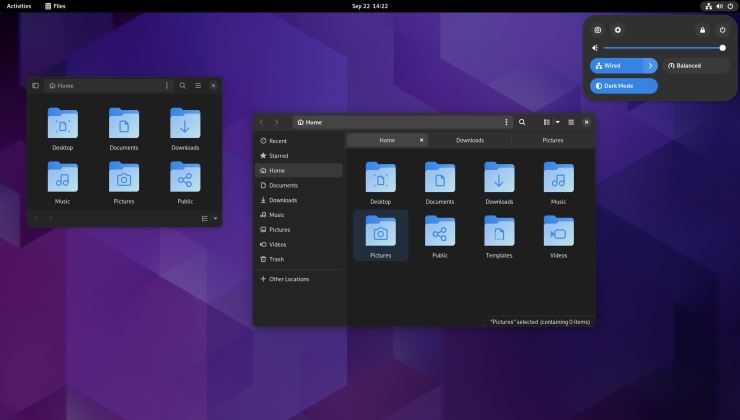
I think it's called "quick settings" (top right on https://www.gamingonlinux.com/uploads/articles/tagline_image... ) where the power, internet, etc menus are. I think that's mostly just the thing that I remembered most aside from the shortcuts menu changes, but it was mainly the fact that I couldn't patch in my need for customization with extensions well enough anymore that made me realize GNOME wasn't my thing. It was just what was there when I started and I worked around it.


Obligatory car analogy: a mechanic working in his shop has a completely different set of tools available than if he was going into the field to fix a car.